
Loop Engineering is the practice of automating how AI agents complete complex, iterative work. Instead of crafting a single perfect prompt, you design a repeatable cycle where an agent works, verifies its own output, persists state, and iterates until a verifiable stop condition is met. For enterprises, this shift turns AI from an assistant into an operating system.
What is Loop Engineering?
Loop Engineering is about automating the process of guiding AI agents to complete complex and iterative work. On the Claude Code team, loops are defined by four dimensions: how they are triggered, how they are stopped, what primitive is used, and what type of task is most appropriate.
Prompting is manual. Loops are systems. A prompt asks for an outcome once. A loop ensures the outcome meets a standard every time, with tools, memory, and self-verification built in.
Why Traditional Engineering Can't Scale for AI

Agentic Loop Engineering replaces that linearity with a continuous cycle. McKinsey research shows why this matters. Organizations progress across three horizons of productivity. Horizon 2, where AI augments discrete tasks within the existing lifecycle, delivers modest gains of about 1.2 times. Horizon 3, where the lifecycle is redesigned around AI agents with humans guiding and validating outputs, results in approximately twofold productivity gains.
The same study found that the highest-performing AI-driven software organizations saw 16 to 30 percent improvements in team productivity, customer experience, and time to market, as well as 31 to 45 percent improvement in software quality. Incremental tooling gives incremental lift. Redesigning around loops gives a step-change.
How Agentic Loop Engineering Works
The production pattern emerging across enterprise teams has six steps, anchored by a shared context file.
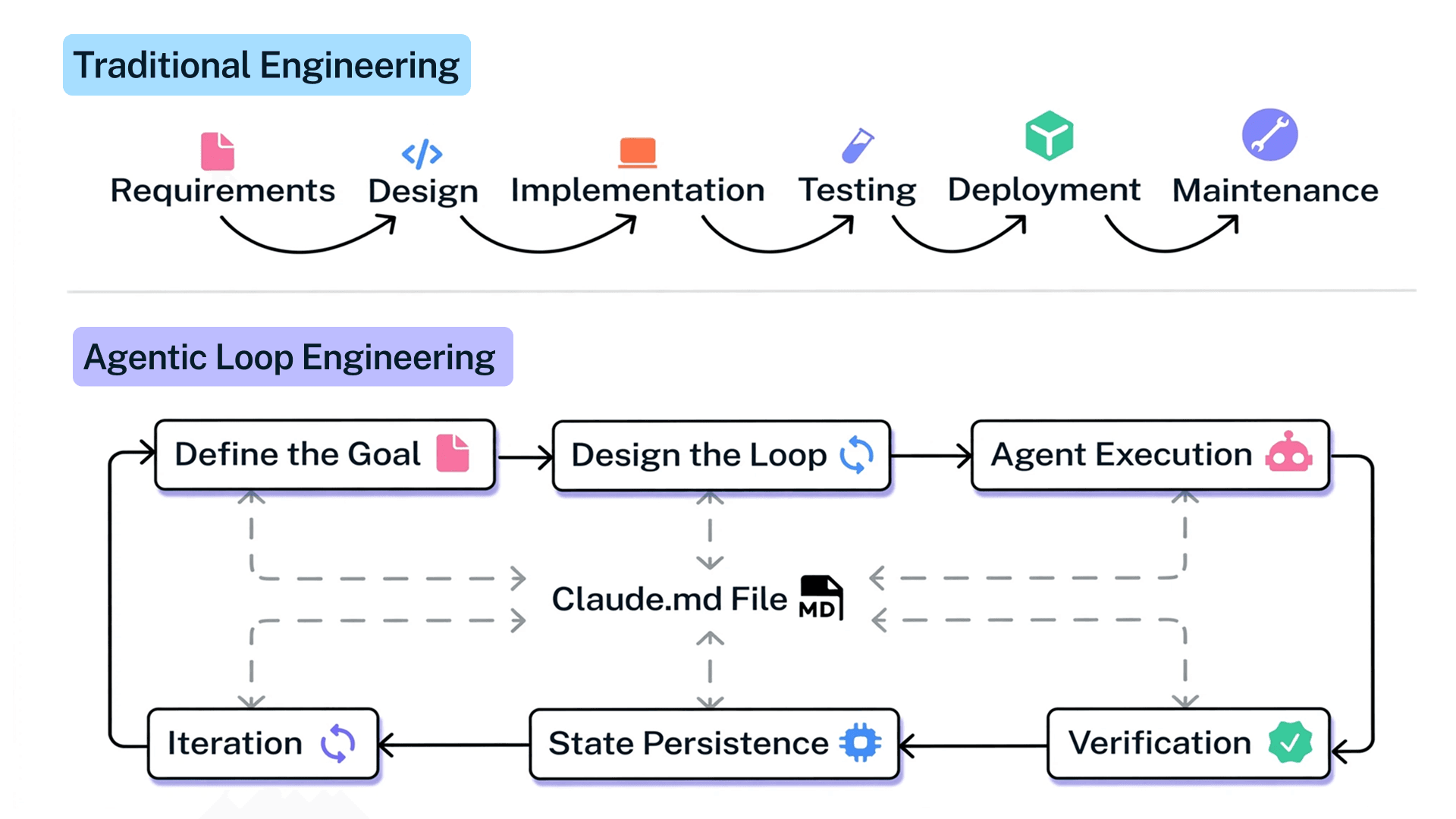
1. Define the Goal
- Start with a verifiable outcome. “Get the homepage Lighthouse score to 90 or above, stop after 5 tries” works. “Improve performance” does not. Deterministic criteria allow an evaluator model to decide whether the loop should continue.
2. Design the Loop
- Choose the primitive. In Claude codem, Use `/goal` for bounded iteration, `/loop 5m` for time-based checks on a PR, and `/schedule` to move a routine to the cloud. Define the stop condition explicitly.
3. Agent Execution
- Agents act with tools, not just text. They read code, run tests, interact with browsers, and call APIs.
4. Verification
- This is the most important step. Encode your Definition of Done in a SKILL.md file so the agent can self-verify like a human reviewer.
- For a UI change: start the dev server, open the page, click the new control, take a screenshot before and after, check the browser console for no new errors, and run a performance trace.
- If any step fails, fix and rerun from step one. Do not hand back partially verified work.
5. State Persistence
- All loops need memory.
- In Claude Code, the Claude.md file is the shared context layer. Every turn, every agent, and every verification result writes back to it.
- This prevents context deprivation, which is the primary reason agentic AI underperforms in enterprise environments.
6. Iteration
If verification fails, the loop continues. This is how teams achieve outsized gains without sacrificing quality. One Accenture client using an Agentic Semantic Layer deployed over 300 data products across 25 domains, achieved a 600% throughput improvement for data sourcing teams, and realized 30-40% data infrastructure savings.
4 Common Agentic Loop Design Patterns Enterprises Need
1. Turn-Based Loops
Triggered by: user prompt. Stop: agent judges complete or needs context. Best for: shorter, exploratory work.
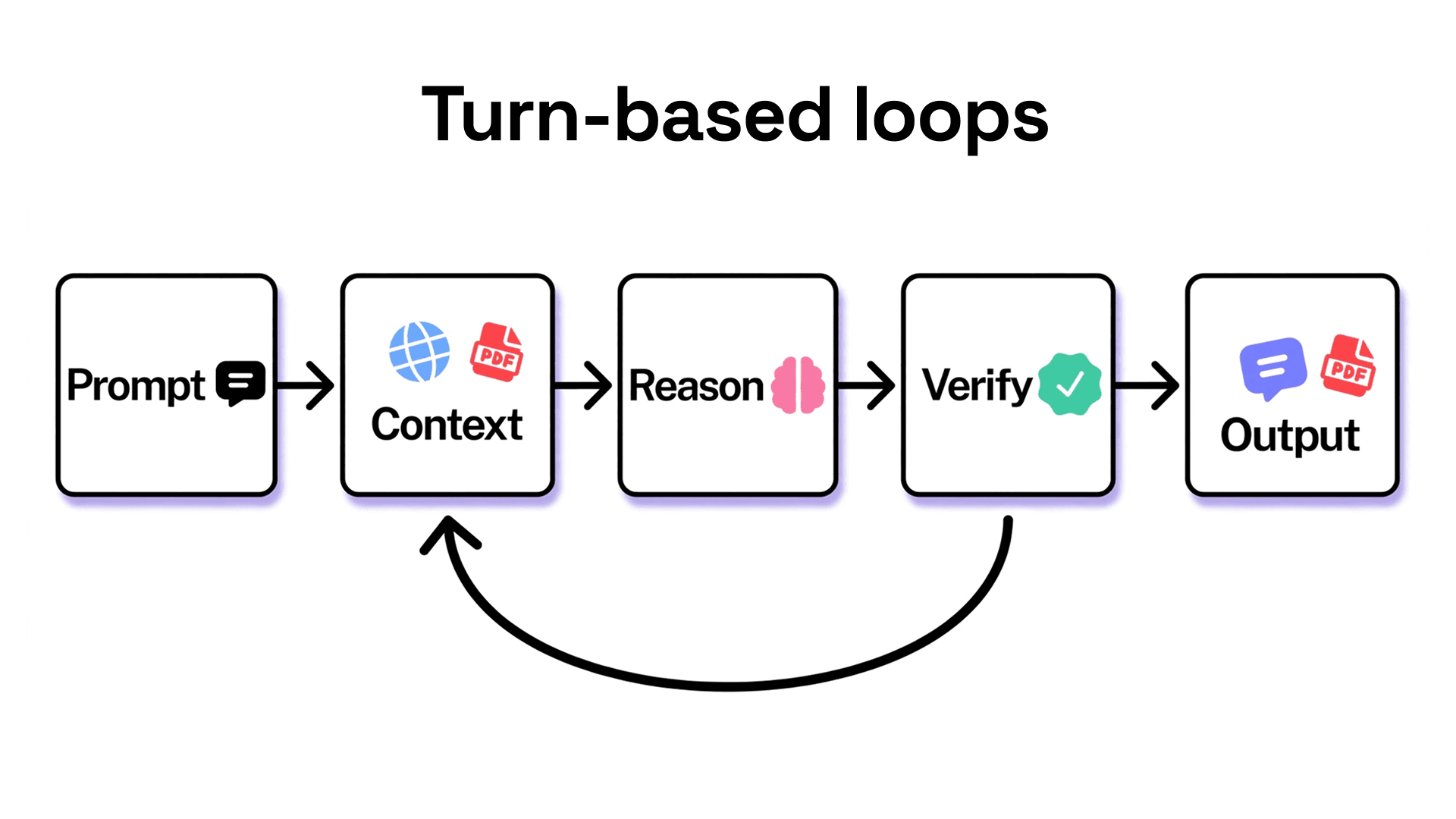
Every prompt you send starts a manual loop where you direct each turn. Claude gathers context, takes action, checks its work, and responds. You then manually verify and write the next prompt. Improve this by moving your manual checks into a skill. A `verify-frontend-change` skill can enforce quantitative checks, reducing the number of turns needed. Use this pattern when you are exploring or when judgment must stay with you.
2. Self-Reflection Loops
A Generator Agent drafts the first response, and a Critique Agent reviews it. Both use tools and a golden dataset to improve.
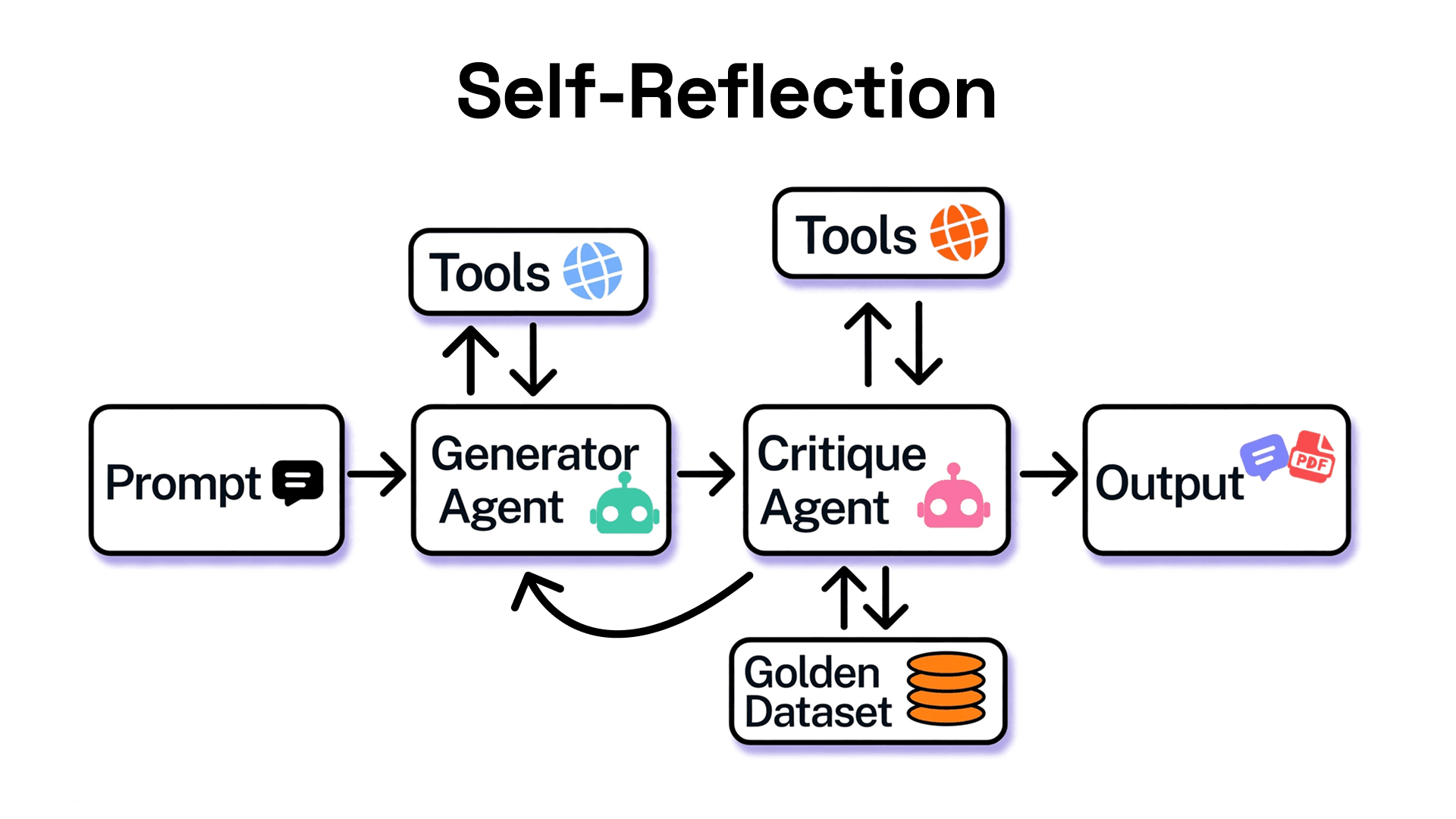
Enterprise use case: legal documentation, policy generation, and compliance artifacts.
3. The Compound Loop
Complex loops where a Query Agent manages Meta-Agents, and each Meta-Agent manages Sub-Agents. Feedback from verification returns to the Query Agent to replan.
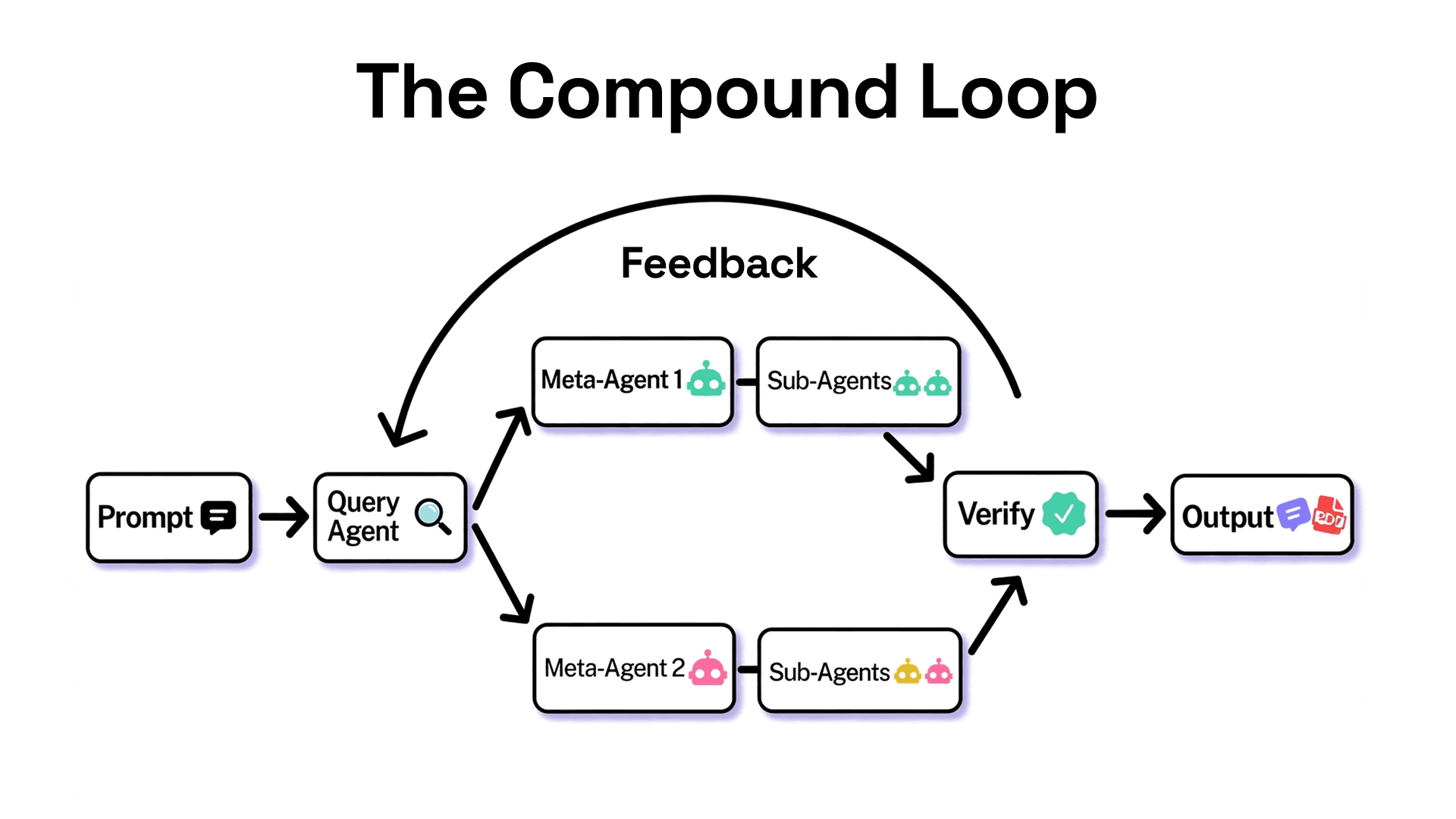
Enterprise use case: code migrations and platform modernization.
4. Parallelization
A Meta Query-agent runs Sub-Agents in parallel for speed, with a Verifier maintaining accuracy. For example, explore three solutions in parallel worktrees and have a judge adversarially review them.
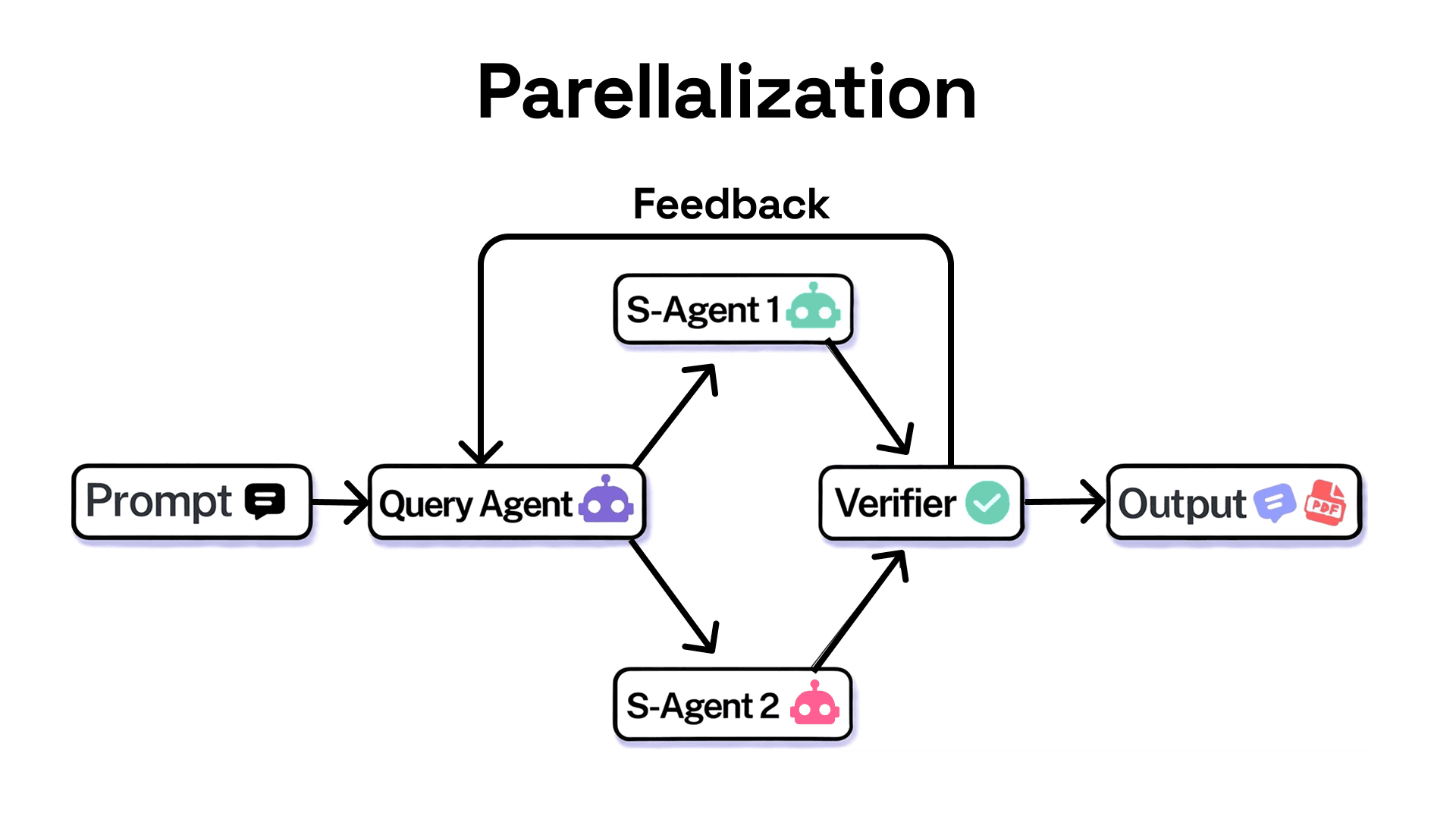
Enterprise use case: Large-scale code refactoring, security remediation, and dependency upgrades. Autonomous coding agents are rapidly becoming a core part of enterprise software development, helping engineering teams modernize legacy codebases, strengthen security, manage technical debt, and accelerate maintenance tasks.
Why Enterprises Should Care Now
Adoption is already crossing the chasm. BCG with MIT Sloan Management Review found 35% of organizations already use agentic AI and another 44% plan to do so soon.
Cost reduction is measurable. More than 40% of enterprises report seeing agentic AI in bids more often, and approximately 20% of the largest enterprises have already seen a 25% to 40% reduction of total cost of ownership in deals with agentic AI.
Industry outlook: Gartner predicts that by 2029, 60% of organizations will adopt smaller software engineering teams as AI automates routine development work.
For engineering leaders, this translates to the headline numbers in the enterprise guide: 8x code throughput, 20% better debugging, and 30% less cycle time when loops are designed with proper verification.
10-Level Adoption Framework for Seamless Integration
Do not attempt to automate everything at once. The most successful enterprises progress through ten deliberate levels.
Level 1: Observe and Map
- Audit where your team spends time. Identify repetitive, high-friction workflows like status updates, flaky test triage, and documentation drift. No automation yet, just measurement.
Level 2: Test Loops on Non-Invasive Tasks
- Run turn-based loops on safe work: code explanation, test generation, and docstring creation. Learn how your codebase responds to agents without changing production.
Level 3: Standardize Context
- Create your first Claude.md file and one SKILL.md. Define what good looks like for your team. Require every epic template to include the target user, the job to be done, the pain point, and the definition of finished. Clear inputs create better agent outputs.
Level 4: Pilot Single-Team Repetitive Automation
- Pick one bottleneck where you are the reviewer. Automate PR description generation, lint fixing, or Slack bug summarization. Use `/goal fix all lint errors in /src/components, stop after 5 tries` to enforce a turn cap.
Level 5: Introduce Verifiable Goal-Based Loops
- Shift from “try until it feels done” to “stop only when tests pass.” Set deterministic success criteria. Add quantitative checks like Lighthouse score, test coverage, or zero console errors. Let an evaluator model check completion.
Level 6: Integrate Loops into Core Development Processes
- Make verification skills part of Definition of Done. Every team ships a SKILL.md for their domain. Code review requires a second agent with fresh context to avoid bias from the main agent’s reasoning.
Level 7: Add Time-Based and Scheduled Loops
- Move from manual triggers to `/loop` and `/schedule`. Examples: `/loop 5m check my PR, address review comments, and fix failing CI` or schedule every morning to summarize feedback channels. Match the interval to how often the watched system changes.
Level 8: Scale to Multi-Team Compound Loops
- Compose proactive loops. A scheduled routine checks for new bug reports, a goal defines triage until empty, and dynamic workflows orchestrate Meta-Agents and Sub-Agents to explore solutions in parallel. Route fast tasks to smaller models and judgment calls to the most capable model.
Level 9: Implement Parallelization and Governance
- Run Sub-Agents in parallel for large refactors and migrations. Add governance: real-time monitoring of agent performance, drift detection, human-in-the-loop escalation, audit trails, compliance reporting, and policy enforcement. Ensure agents only access what they are authorized to see.
Level 10: Embed as Default Operating Model
- Agents are onboarded like employees. Role boundaries blur, as seen at McKinsey Sonar, where developers contributed more to research and product managers accelerated prototyping. Teams become agent managers who guide, review, and refine how work gets done. Loop engineering becomes the way we work, not an experiment on the side.
Best Practices for Quality and Cost Control
Quality depends on the system, not a single prompt. Keep the codebase clean because agents follow existing patterns. Give agents a way to verify with browsers, tools, and performance APIs, not just assertions. Make framework docs reachable from Claude.md. Use a second agent for code reviews.
To control cost, choose the right primitive and model for the job. Define clear success and stop criteria so agents arrive at solutions sooner. Pilot on a small slice before large runs because dynamic workflows can spawn hundreds of agents. Use scripts for deterministic work. Review token usage with `/usage`, `/goal`, and `/workflows` to see breakdowns by skill and subagent.
FAQ
- What is the difference between prompt engineering and loop engineering?
- Prompt engineering optimizes a single input. Loop engineering designs a system that repeats cycles of work until a verifiable condition is met, using tools, memory, and verification.
- When should I use turn-based loops versus goal-based loops?
- Use turn-based loops when exploring or when judgment must stay with you. Use goal-based loops when you know what done looks like and can define it with numbers or tests.
- What does the Claude.md file do?
- It is the persistent context file all agents read and write to. It prevents context loss across iterations and enables state persistence for parallel sub-agents.
- Is loop engineering only for coding?
- No. The same patterns apply to customer service, finance close, marketing workflows, and clinical documentation, where agents can plan, act, and verify end-to-end processes.
Conclusion
Traditional engineering gave us linear pipelines. Loop engineering gives us self-correcting systems that define goals, execute, verify, persist state, and iterate.
Enterprises that progress through the ten levels, starting with observation and non-invasive tests and ending with loops as the default operating model, capture the disproportionate growth highlighted by McKinsey, Gartner, BCG, and Deloitte. Those who treat agents as faster autocomplete see only modest gains. Those who redesign around loops see transformative throughput, quality, and speed.
Pick one task where you are the bottleneck. Write the verification check as a skill. Run the loop. Then iterate on the system itself.
References
1. Case study: AI in the product development life cycle | McKinsey
2. Leading AI-driven software organizations show the way | McKinsey
3. Accenture and AWS accelerate data transformation with agentic AI | AWS Partner Network (APN) Blog
4. The $200 Billion AI Opportunity in Tech Services | BCG
6. AI agent orchestration | Deloitte Insights
7. Agents Accelerate the Next Wave of AI Value Creation | BCG
8. 25% of enterprises using AI will deploy AI agents by 2025
9. Agentic AI Stats 2026: Adoption Rates, ROI, & Market Trends