
The Autonomous SDLC: Powered by Claude Code
Most teams using Claude Code are treating it like a faster autocomplete
and capturing 20% of what it actually offers.
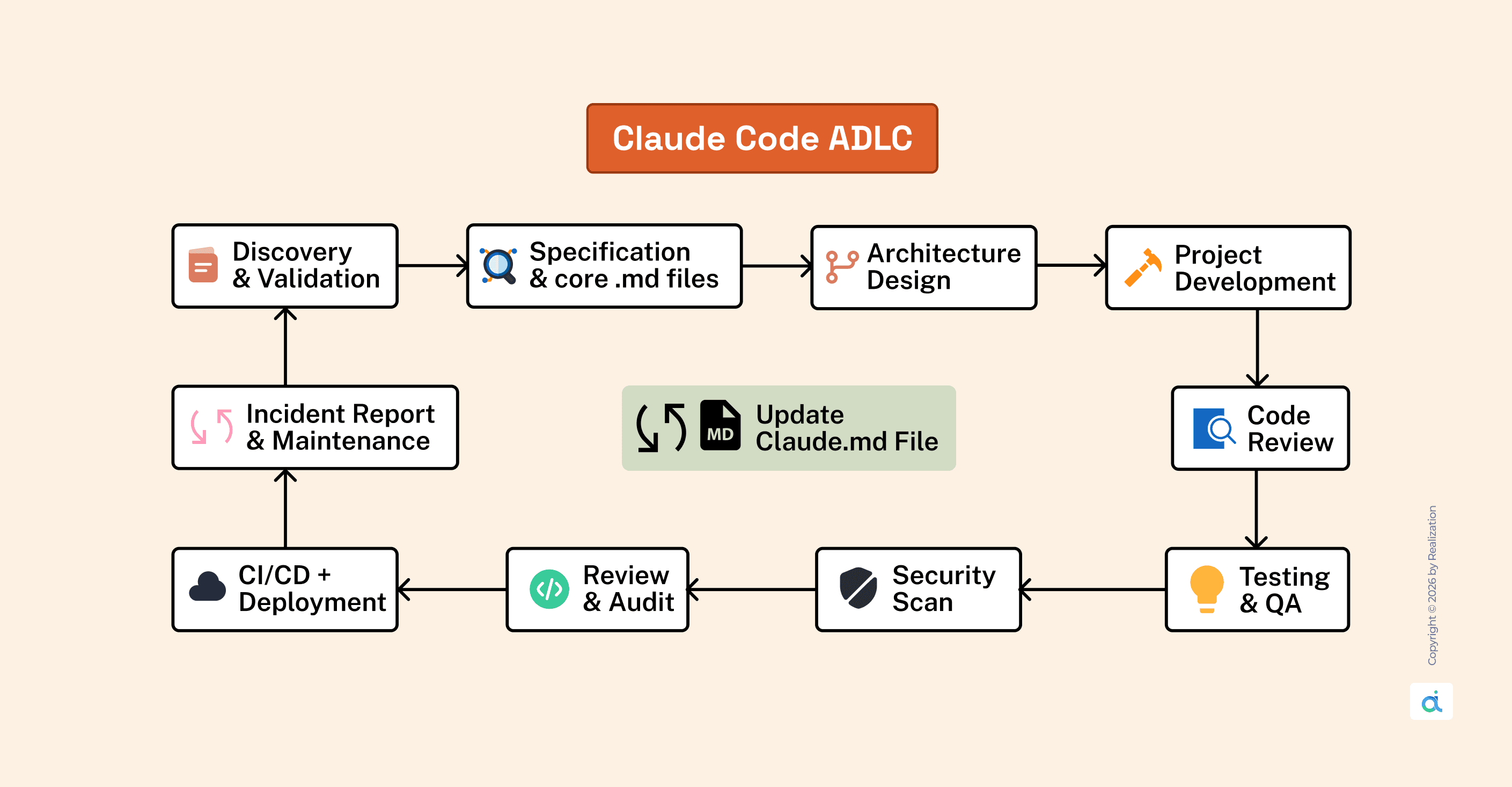
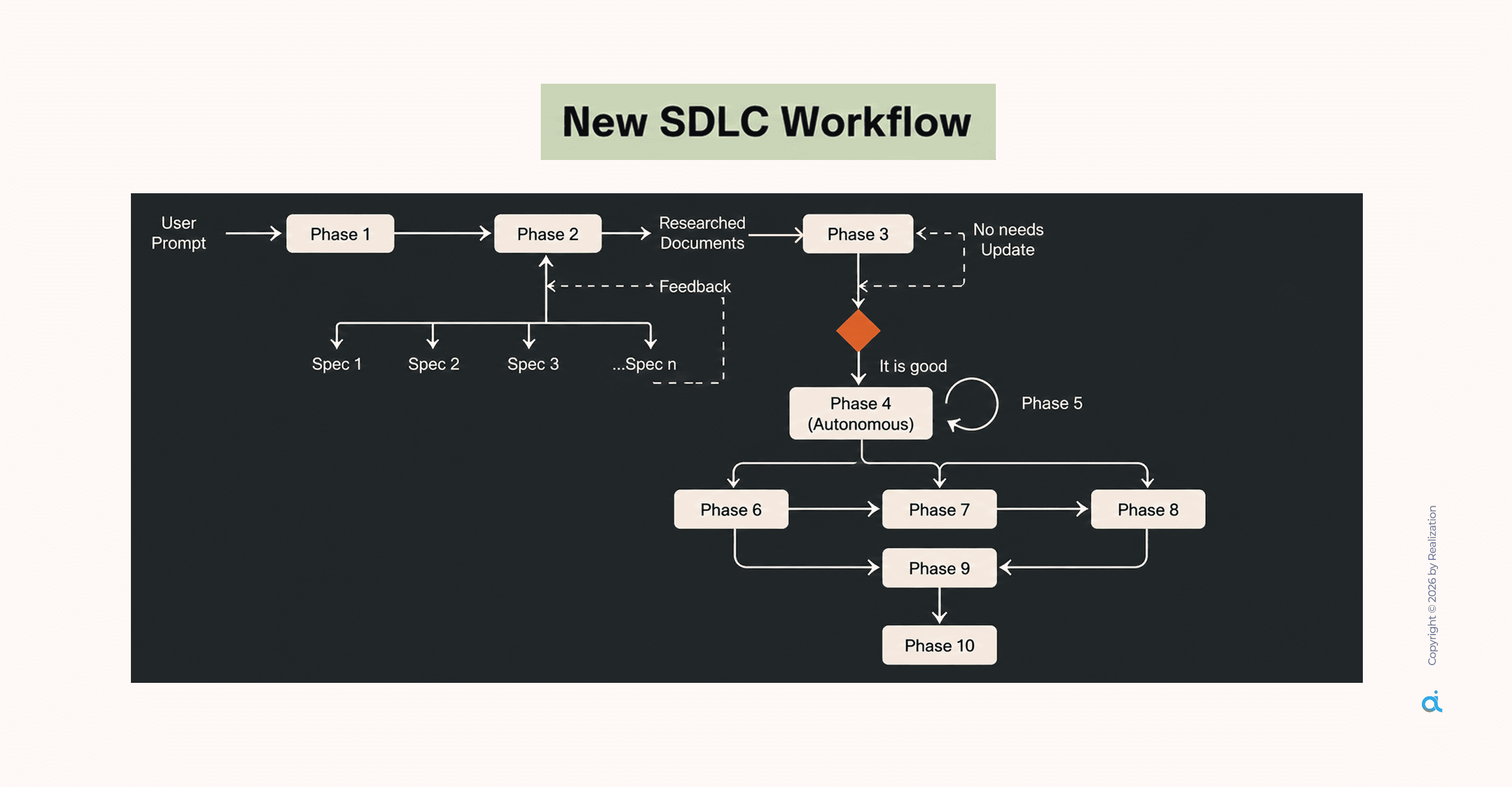
This guide walks through the complete Claude Code ADLC (AI-Driven Development Lifecycle) framework:
10 structured phases, security gates at every step, and a feedback loop that makes the system smarter every time you use it.
If you lead engineering teams, evaluate AI tooling, or are accountable for what reaches production, this is worth your time.
What Claude Code Actually Is
Before the framework, the mental model matters.
Claude Code is a repo-aware terminal agent, not a smarter autocomplete, not a chatbot bolted onto an IDE.
It reads your entire project at once, traces imports across files, maps dependencies, and generates code that fits your architecture.
What separates it from everything else in the category:
- Full codebase context, the entire repo held in memory simultaneously; no chunking, no partial reads
- Tool execution reads, writes, runs tests, searches, and iterates without you switching context
- Parallel sub-agents, multiple agents running on different parts of the same project simultaneously
- Model flexibility not locked to Anthropic; works with GPT, Gemini, and 70+ providers
- MCP connectivity connects natively to GitHub, Slack, databases, and external APIs
- Privacy by default code is processed in the cloud, never stored, never used for training
That last point matters. For teams managing proprietary systems or client codebases, it's the difference between deploying this and not.
The Framework: 10 Phases, One System
Each phase has:
- A defined input from the previous phase
- A structured output document (.md file)
- A security gate before progression
The problem this solves: AI-generated code that works in isolation but breaks the system around it. Context and structure prevent that. This framework provides both.
Phase 1: Discovery & Validation
Give the core prompt and ask Claude to build logic based on your researched document.
Every engagement starts here. Before a single line of code is written, Claude Code scans the project and produces a DISCOVERY.md.
What it surfaces:
- Tech stack detected from package.json and file structure
- Entry points and route organization
- Security gaps: missing auth, exposed secrets, unvalidated inputs
- Technical debt: stale dependencies, zero test coverage
- Performance risks: N+1 queries, blocking I/O patterns
- Architectural issues: tight coupling, missing separation of concerns
This is the phase that prevents production incidents that were visible from day one. Do not skip it.
Phase 2: Specification & Core .md Files
Write requirements and generate core .md files based on your researched document.
This phase converts what was discovered into a structured specification that the agent can execute from. Two documents come out of this phase:
CLAUDE.md the agent's project memory. It should contain:
- Stack: framework, language, database, ORM
- Allowed operations: what the agent can execute autonomously
- Denied operations: what requires human confirmation or is blocked entirely
- Security rules: conventions, patterns, hard limits
- Coding conventions: linting config, naming patterns, error handling approach
- Lessons learned: updated after every retrospective
Keep it under 500 lines. Use environment variable placeholders, never real credentials. Update it consistently.
The teams getting generic output from Claude Code have a CLAUDE.md problem.
IMPLEMENTATION_PLAN.md: what every task entry includes:
- Description of what gets built
- Explicit dependencies on prior tasks
- Acceptance criteria that are specific and measurable ("JWT token returned in under 200ms," not "it works")
- Security subtasks are baked in alongside feature subtasks
The agent reads this document at the time of implementation. It is executing a plan, not guessing from a one-line prompt.
Phase 3: Architecture Design
Create system architecture and flows based on your research document.
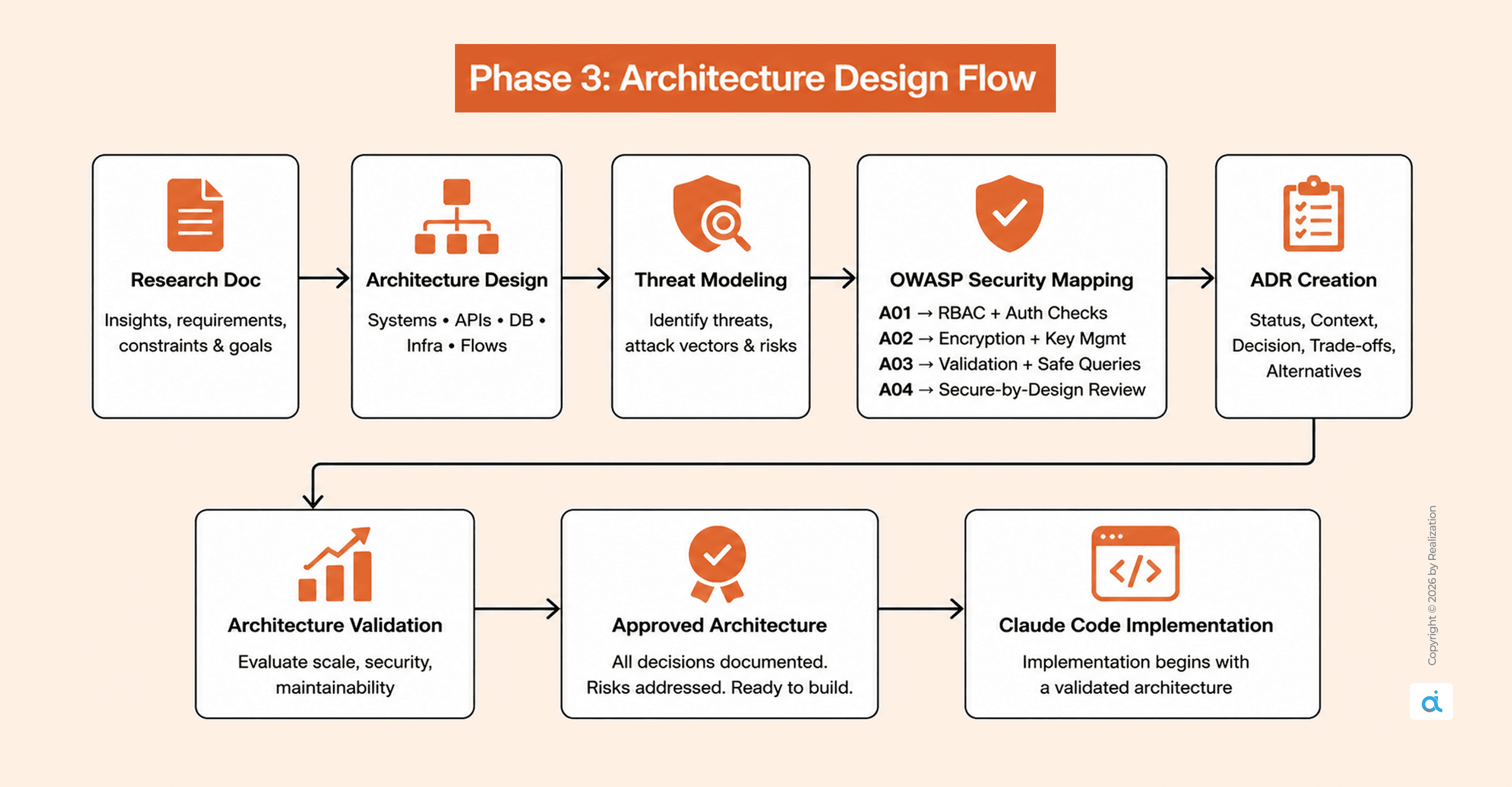
Every significant architectural decision becomes an Architecture Decision Record (ADR) before implementation starts. Each ADR captures:
- Status: Proposed → Accepted → Deprecated
- Context: the problem being addressed
- Decision: the chosen approach
- Consequences: both positive and negative trade-offs
- Alternatives considered: and why each was rejected
Security requirements are mapped here against the OWASP Top 10:
- A01 Broken Access Control: Role-based routes, authorization at every endpoint
- A02 Cryptographic Failures: Encryption standards, key management policy
- A03 Injection: Input validation schema, parameterized queries only
- A04 Insecure Design: Threat modeling before the first line of code
ADRs prevent the most expensive class of AI-assisted development error:
reasonable-by-default architectural choices that are wrong for your specific system, discovered only after 500 lines of generated code have been built on top of them.
Phase 4: Project Development
Generate production-ready code modules based on your researched document.
This is where implementation begins, and it runs from the plan, not from improvisation.
For a login endpoint, a single structured prompt generates:
- auth.service.ts core business logic
- auth.controller.ts HTTP request handling
- auth.routes.ts routing configuration
- auth.middleware.ts JWT validation
- auth.test.ts unit and integration tests
Secure coding defaults are applied automatically when CLAUDE.md is correctly configured:
- bcrypt password hashing at cost factor 12, never plain text
- JWT signed from environment variable secrets, expiration required
- Input validation before any database operation
- Parameterized queries throughout, no raw SQL string concatenation
- Custom error classes for structured, consistent error handling
Context pack discipline: Start with 3–5 seed files (package.json, entry point, task-relevant files). Trace imports. Cap the context pack at 8 files maximum. More context does not produce better output; it produces diluted, unfocused output.
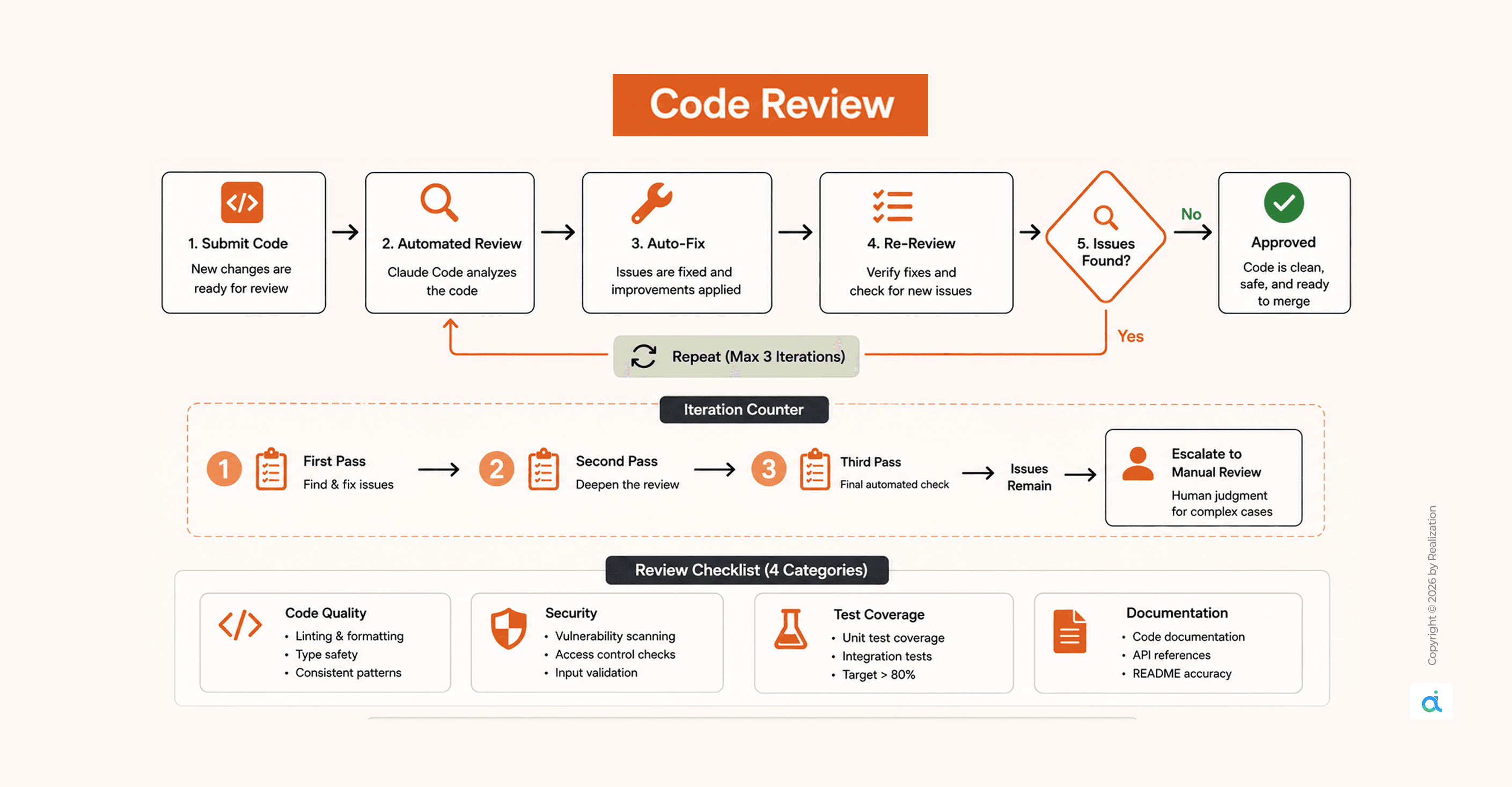
Phase 5: Code Review
Review the code and fix issues based on your researched document.
Claude Code reviews and self-corrects in a loop up to three iterations before escalating to manual review.
Review the checklist across four categories:
- Code quality: ESLint, TypeScript strict mode, consistent patterns
- Security: OWASP Top 10, auth checks, injection prevention
- Test coverage: target above 80%; unit and integration
- Documentation: JSDoc on public methods, README accuracy
The 3-iteration cap matters. It prevents infinite loops while still catching the majority of issues automatically. What remains after three passes genuinely requires human judgment, and that's exactly when it escalates.
Phase 6: Testing & QA
Generate test cases and validate outputs based on your researched document.
Testing is not an afterthought; it is generated alongside implementation and validated in this dedicated phase.
What gets covered:
- Unit tests: individual functions and methods in isolation
- Integration tests: how modules interact across the system
- Edge case tests: boundary conditions, malformed inputs, empty states
- Regression tests: ensuring new changes do not break existing behaviour
Target: above 80% coverage before any code advances to the security scan.
Every test file is generated with the same context pack used during development, so the tests understand the architecture they are validating, not a generic approximation of it.
Phase 7: Security Scan
Scan for vulnerabilities and patch risks based on your research document.
Three layers run in parallel, wired into GitHub Actions, not bolted on at the end:
- Static analysis: CodeQL and Semgrep scan every commit
- Dynamic testing: penetration testing against running environments
- Threat modeling: STRIDE analysis at the architectural level
The pipeline sequence:
Commit → Build → Test → Security Scan → Staging → Deploy → Smoke Test
Security is not a final gate. It is a continuous layer across the entire delivery chain.
13 binary security gates are distributed across the lifecycle:
- 3 gates in planning: requirements captured, features decomposed, specs complete
- 2 gates in development: backend tests pass, integration complete
- 3 gates in audit: UI analysis, all tests green, quality scorecard met
- 5 gates in validation: issues mapped, fixes verified, hardening complete, accessibility checked, release certified
Nothing advances until the gate passes.
Phase 8: Review & Audit
Audit system logic and improve reliability based on your research document.
Before deployment, a full audit pass is run across:
- Business logic correctness against the original spec
- API contract conformance
- Data integrity checks
- Accessibility (WCAG compliance where relevant)
- Performance benchmarks against defined thresholds
Outputs: a quality scorecard and a signed-off audit trail. For teams with compliance or regulatory requirements, this phase produces the paper trail that survives review.
Phase 9: CI/CD + Deployment
Generate pipelines and deploy the project based on your research document.
Three-environment progression:
- Development: Local, debug enabled, local database
- Staging: Cloud-hosted, mock data, mirrors production config
- Production: Real data, canary rollout, full monitoring active
Rollback triggers defined in advance, not during an incident:
- Deploy pipeline failure → revert to the previous tag automatically
- Test suite failure → deployment rejected before staging
- Smoke test failure → auto-rollback triggered immediately
One command. No on-call decision-making under pressure.
Post-deployment monitoring targets:
- API Latency (p99): Target under 200ms, alert above 500ms
- Error Rate: Target under 1%, alert above 5%
- Request Volume: Baseline tracked, alert on 50% spike
- Auth Failures: Target under 10/min, alert above 100/min
Structured logging to Winston or Pino. Alerts are routed to PagerDuty or Slack.
Every log entry carries: user ID, operation, outcome, and duration.
Phase 10: Incident Report & Maintenance
Debug incidents and maintain updates based on your research document.
Every completed cycle and every incident produces a RETROSPECTIVE.md:
- What worked: patterns worth keeping
- What didn't: the failures and root causes
- Action items: concrete changes with owners
- Metrics: time-to-implement, issues found vs. fixed
The critical step: lessons get written back into CLAUDE.md.
The agent gets calibrated to your specific project after every cycle. The CLAUDE.md at month three is a materially different document from the one at week one, because it encodes everything the team has learned.
This is the mechanism that turns Claude Code from a tool you use into a system that improves.
The MCP Layer: Connecting to Everything External
Claude Code connects to external systems via MCP (Model Context Protocol) servers, each sandboxed with an explicit permission boundary.
Recommended default configuration:
- Allow: GitHub, memory
- Block: filesystem, exec
- Require approval: database
One security risk to manage: tool poisoning, malicious instructions embedded in MCP tool descriptions that alter agent behaviour. The protection is metadata validation at the tool level, checking descriptions for suspicious patterns before execution is permitted.
Who Should Implement This
The setup investment pays back fastest in three situations:
- Multi-file, long-running projects DISCOVERY.md and IMPLEMENTATION_PLAN.md let the agent orient from documents, not fragile session memory. Context loss between sessions stops compounding.
- Organizations with compliance or audit requirements, 13 security gates, and OWASP-mapped design phases produce a paper trail that survives review.
- Agencies and consultancies managing multiple client codebases, CLAUDE.md is per-project. Conventions travel with the codebase, not the developer.
For experiments and one-off scripts, free session mode, no structure required. The guide is explicit: not everything warrants SDLC overhead. Production work always does.
The ADLC framework shifts Claude Code from reactive to systematic.
Instead of prompting and hoping, you are configuring a system that plans, executes, reviews its own output, and compounds knowledge across every cycle.
The initial cost is real: a well-written CLAUDE.md, a first round of ADRs, and a wired security pipeline. Not an afternoon.
But it is a one-time investment per project, after which you stop re-explaining your architecture to an agent with no memory of yesterday.
The tools worth building workflows around are the ones that get better the more you use them.
Further Resources
Claude Code
- code.claude.com official docs and quickstart
- docs.anthropic.com/en/docs/claude-code full technical documentation
- docs.anthropic.com/en/docs/claude-code/security permissions and security reference
DevSecOps and Security
- owasp.org/Top10 the OWASP Top 10 baseline mapped throughout this guide
- https://semgrep.dev/ static analysis tooling in the security pipeline
- docs.github.com/en/actions GitHub Actions for CI/CD configuration
MCP
- modelcontextprotocol.io MCP protocol documentation
- docs.anthropic.com/en/docs/claude-code/mcp Claude Code MCP configuration reference